5 Process Capability Studies
5.1 Learning Objectives
By the end of this chapter, you will:
- Calculate and interpret capability indices (Cp, Cpk, Pp, Ppk)
- Understand the difference between capability and performance indices
- Distinguish between specification limits and control limits
- Conduct comprehensive process capability studies
- Use capability indices for decision-making in process improvement
5.2 Introduction to Process Capability
Process capability14 answers one of the most important questions in quality management: “Is my process capable of meeting customer requirements?”
Think of process capability as the “report card” for your process , it tells you how well your process performs relative to what your customers expect.
5.2.1 Voice of the Customer vs Voice of the Process
Two Critical Voices
- Voice of the Customer (VOC): What the customer needs (specification limits)
- Voice of the Process (VOP): What the process actually delivers (control limits)
Process capability compares these two voices to determine if they’re aligned.
5.3 Understanding Capability vs Performance
5.3.1 Process Capability Indices (Short-term)
- Cp and Cpk: Based on within-subgroup variation only
- Represents the process’s potential capability
- Assumes special causes have been eliminated
5.3.2 Process Performance Indices (Long-term)
- Pp and Ppk: Based on overall process variation
- Represents actual process performance
- Includes all sources of variation over time
# Load the pistonrings dataset
library(qcc)
data(pistonrings)

# Prepare data manually by splitting into matrix
diameter_list <- split(pistonrings$diameter, pistonrings$sample)
diameter <- do.call(rbind, diameter_list)

# Create control chart for first 25 samples
q <- qcc::qcc(diameter[1:25,], type = "xbar", nsigmas = 3, plot = FALSE)

# Process capability (short-term)
pc_capability <- qcc::process.capability(q, spec.limits = c(73.95, 74.05))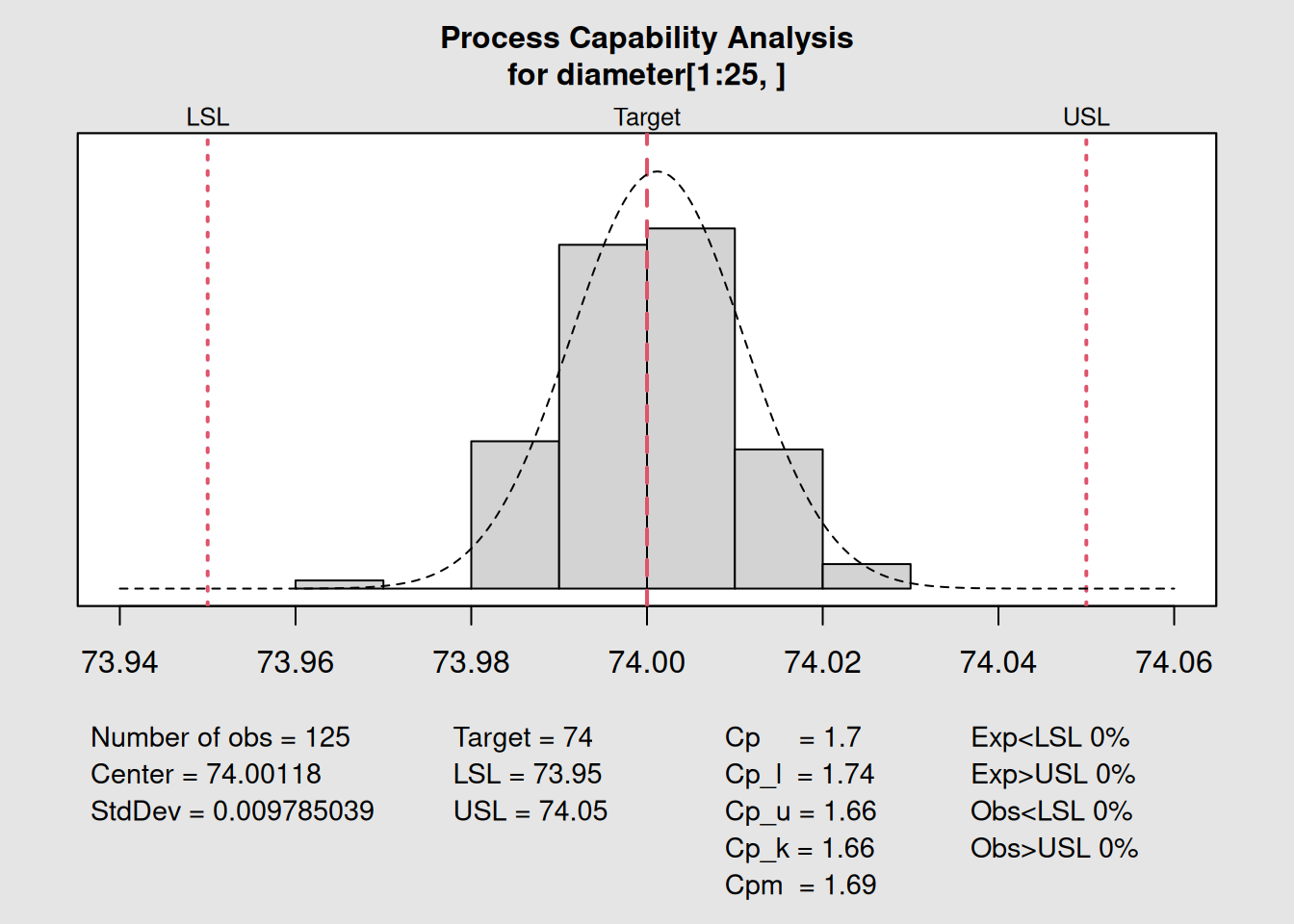
##
## Process Capability Analysis
##
## Call:
## qcc::process.capability(object = q, spec.limits = c(73.95, 74.05))
##
## Number of obs = 125          Target = 74
##        Center = 74              LSL = 73.95
##        StdDev = 0.009785        USL = 74.05
##
## Capability indices:
##
##       Value   2.5%  97.5%
## Cp    1.703  1.491  1.915
## Cp_l  1.743  1.555  1.932
## Cp_u  1.663  1.483  1.844
## Cp_k  1.663  1.448  1.878
## Cpm   1.691  1.480  1.902
##
## Exp<LSL 0%    Obs<LSL 0%
## Exp>USL 0%    Obs>USL 0%
print(pc_capability)## $nobs
## [1] 125
##
## $center
## [1] 74.00118
##
## $std.dev
## [1] 0.009785039
##
## $target
## [1] 74
##
## $spec.limits
## LSL USL
## 73.95 74.05
##
## $indices
## Value 2.5% 97.5%
## Cp 1.703281 1.491411 1.914826
## Cp_l 1.743342 1.554765 1.931919
## Cp_u 1.663219 1.482710 1.843729
## Cp_k 1.663219 1.448129 1.878310
## Cpm 1.691111 1.480113 1.901786
##
## $exp
## Exp < LSL Exp > USL
## 0 0
##
## $obs
## Obs < LSL Obs > USL
## 0 05.4 The Four Key Capability Indices
5.4.1 Cp: Process Potential
Cp15 measures the potential capability of your process—how capable it would be if perfectly centered.
\[Cp = \frac{USL - LSL}{6\sigma}\]
Where:
- USL = Upper Specification Limit
- LSL = Lower Specification Limit
- σ = Process standard deviation (within-subgroup)
Cp Interpretation
-
Cp ≥ 1.33: Capable process
-
Cp = 1.00: Process uses full specification width
-
Cp < 1.00: Process wider than specifications (not capable)
5.4.2 Cpk: Process Capability (Actual)
Cpk16 considers both process spread AND centering.
\[Cpk = min(Cpu, Cpl)\]
Where: - \(Cpu = \frac{USL - \mu}{3\sigma}\) (Upper capability) - \(Cpl = \frac{\mu - LSL}{3\sigma}\) (Lower capability)
5.4.3 Pp: Process Performance Potential
Pp17 is like Cp but uses overall process variation.
\[Pp = \frac{USL - LSL}{6\sigma_{overall}}\]
5.4.4 Ppk: Process Performance (Actual)
Ppk18 considers both spread and centering using overall variation.
Let’s see these indices in action:
# Different scenarios to show index behavior

# Scenario 1: Well-centered, capable process
set.seed(123)
good_process <- matrix(rnorm(250, mean = 74.00, sd = 0.015), ncol = 5)
q_good <- qcc(good_process, type = "xbar", plot = FALSE)
pc_good <- qcc::process.capability(q_good, spec.limits = c(73.95, 74.05))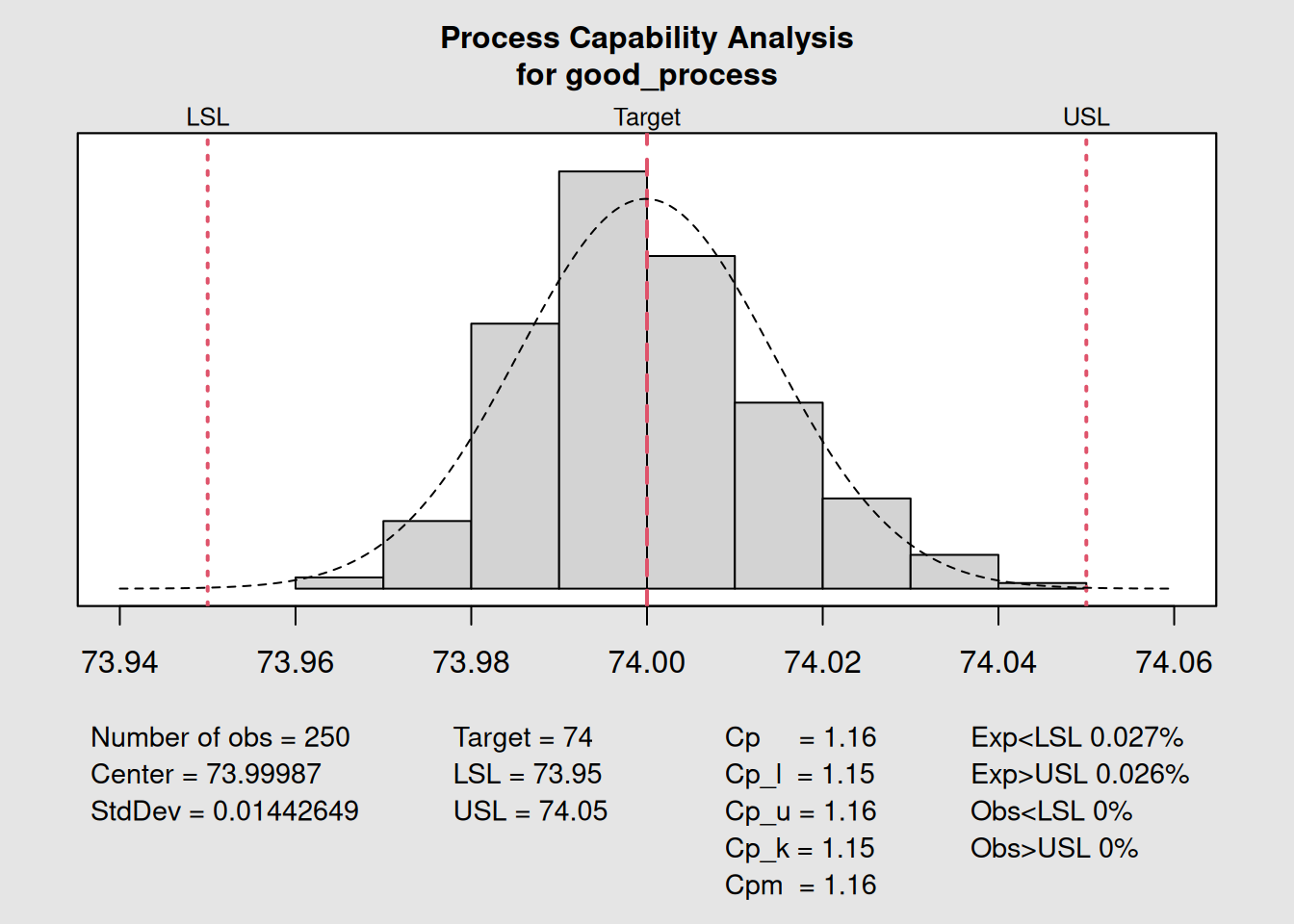
##
## Process Capability Analysis
##
## Call:
## qcc::process.capability(object = q_good, spec.limits = c(73.95,     74.05))
##
## Number of obs = 250          Target = 74
##        Center = 74              LSL = 73.95
##        StdDev = 0.01443         USL = 74.05
##
## Capability indices:
##
##       Value   2.5%  97.5%
## Cp    1.155  1.054  1.257
## Cp_l  1.152  1.061  1.244
## Cp_u  1.158  1.066  1.250
## Cp_k  1.152  1.043  1.262
## Cpm   1.155  1.054  1.256
##
## Exp<LSL 0.027%    Obs<LSL 0%
## Exp>USL 0.026%    Obs>USL 0%
# Scenario 2: Off-center process (same variation)
offset_process <- matrix(rnorm(250, mean = 74.03, sd = 0.015), ncol = 5)
q_offset <- qcc(offset_process, type = "xbar", plot = FALSE)
pc_offset <- qcc::process.capability(q_offset, spec.limits = c(73.95, 74.05))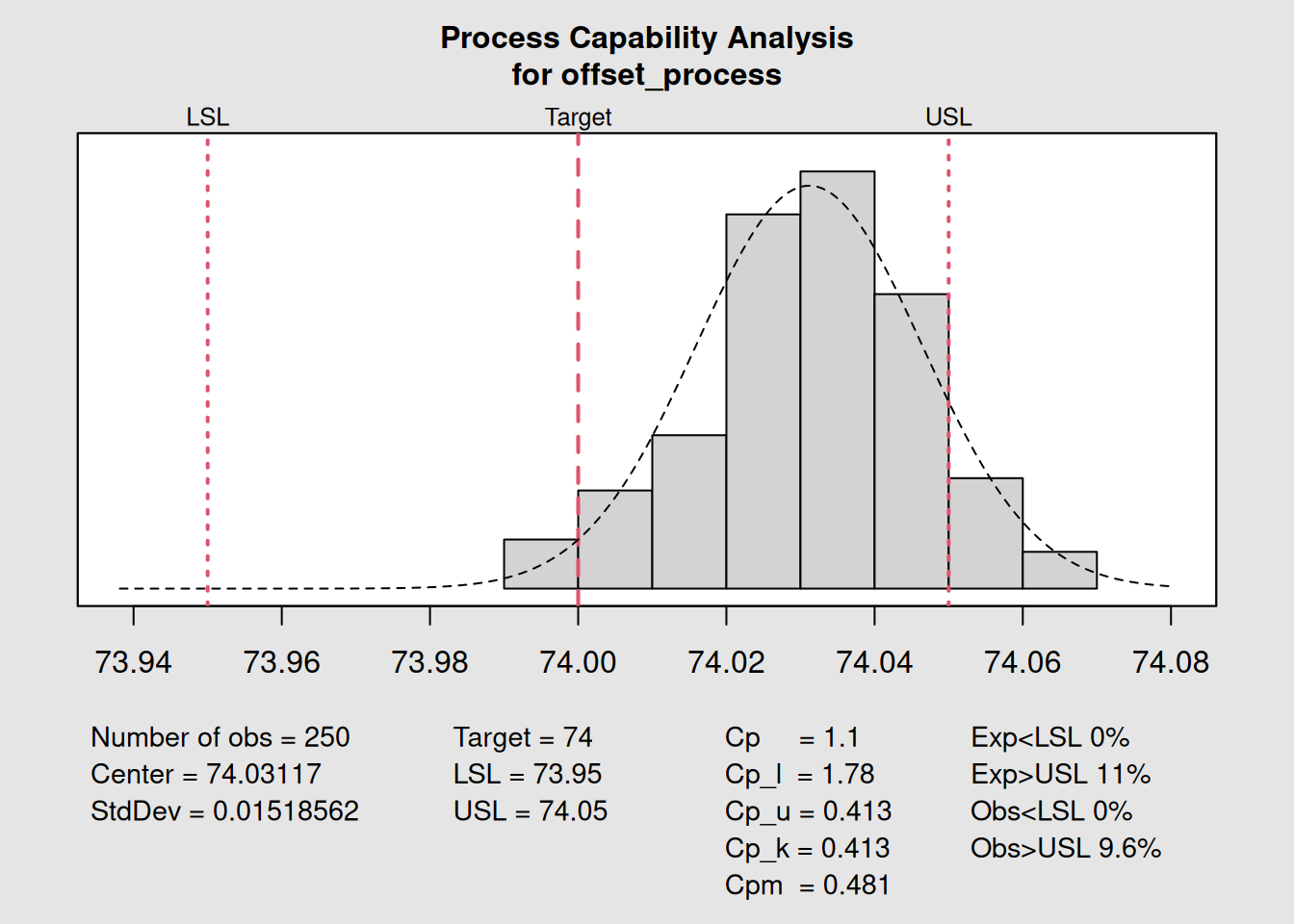
##
## Process Capability Analysis
##
## Call:
## qcc::process.capability(object = q_offset, spec.limits = c(73.95,     74.05))
##
## Number of obs = 250          Target = 74
##        Center = 74.03           LSL = 73.95
##        StdDev = 0.01519         USL = 74.05
##
## Capability indices:
##
##        Value    2.5%   97.5%
## Cp    1.0975  1.0011  1.1938
## Cp_l  1.7816  1.6458  1.9175
## Cp_u  0.4134  0.3673  0.4596
## Cp_k  0.4134  0.3584  0.4684
## Cpm   0.4807  0.4241  0.5373
##
## Exp<LSL 0%    Obs<LSL 0%
## Exp>USL 11%   Obs>USL 9.6%
# Create comparison table
comparison_data <- data.frame(
  Scenario = c("Centered Process", "Off-Center Process"),
  Cp = c(round(pc_good$indices[1], 2), round(pc_offset$indices[1], 2)),
  Cpk = c(round(pc_good$indices[4], 2), round(pc_offset$indices[4], 2)),
  Mean = c(round(mean(good_process), 4), round(mean(offset_process), 4))
)

print(comparison_data)
## Scenario Cp Cpk Mean
## 1 Centered Process 1.16 1.15 73.9999
## 2 Off-Center Process 1.10 0.41 74.03125.5 Capability Study with Real Data
Let’s conduct a complete capability study using the piston rings data:
# Phase I: Establish control
library(qcc)
data(pistonrings)

# Prepare data manually by splitting into matrix
diameter_list <- split(pistonrings$diameter, pistonrings$sample)
diameter <- do.call(rbind, diameter_list)

# Create X-bar chart for process control
q <- qcc::qcc(diameter[1:25,], type = "xbar", nsigmas = 3)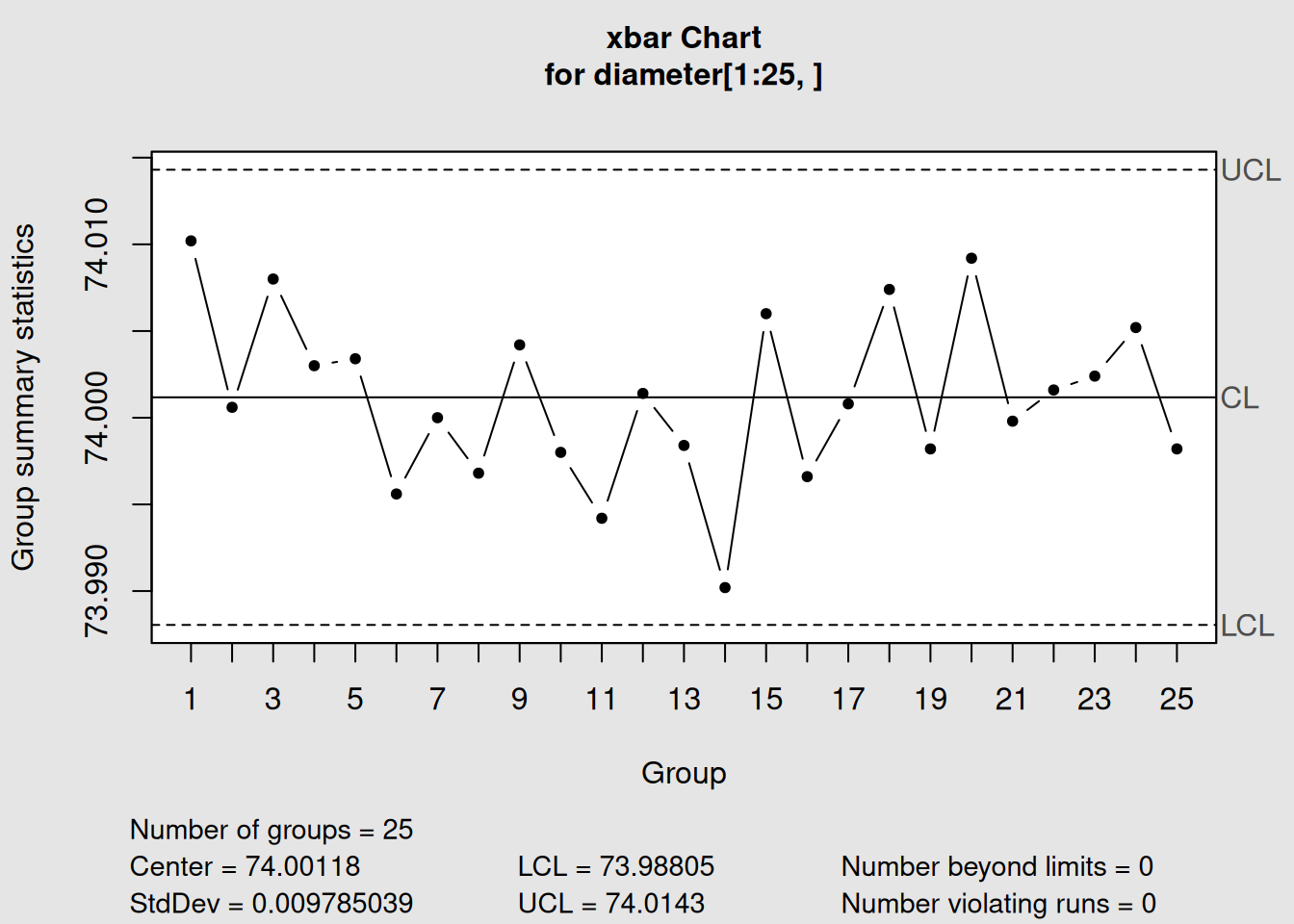
# Perform capability analysis
spec_limits <- c(73.95, 74.05)  # Customer specifications
pc <- qcc::process.capability(q, spec.limits = spec_limits)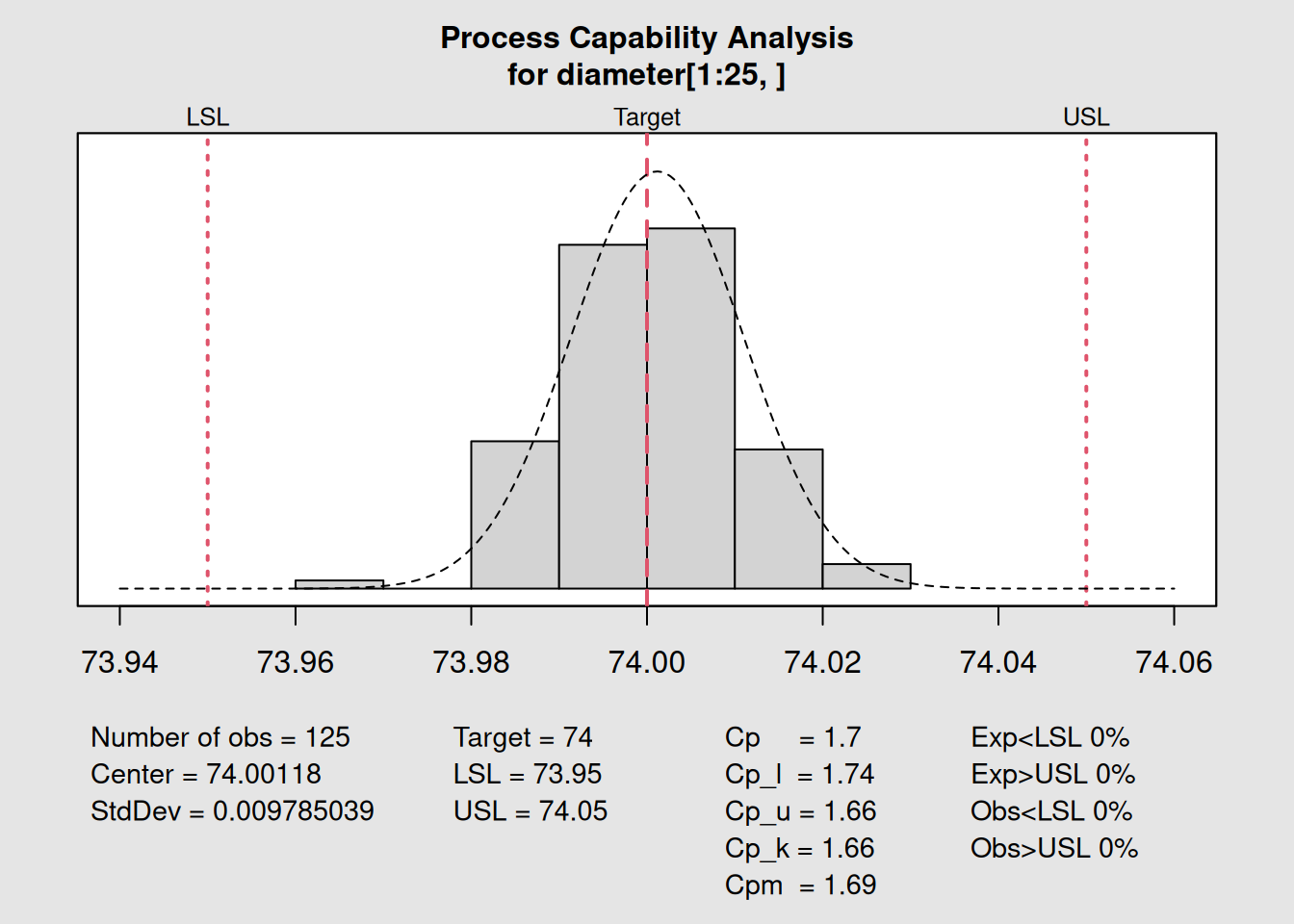
##
## Process Capability Analysis
##
## Call:
## qcc::process.capability(object = q, spec.limits = spec_limits)
##
## Number of obs = 125          Target = 74
##        Center = 74              LSL = 73.95
##        StdDev = 0.009785        USL = 74.05
##
## Capability indices:
##
##       Value   2.5%  97.5%
## Cp    1.703  1.491  1.915
## Cp_l  1.743  1.555  1.932
## Cp_u  1.663  1.483  1.844
## Cp_k  1.663  1.448  1.878
## Cpm   1.691  1.480  1.902
##
## Exp<LSL 0%    Obs<LSL 0%
## Exp>USL 0%    Obs>USL 0%
# Display results
print(pc)
## $nobs
## [1] 125
##
## $center
## [1] 74.00118
##
## $std.dev
## [1] 0.009785039
##
## $target
## [1] 74
##
## $spec.limits
## LSL USL
## 73.95 74.05
##
## $indices
## Value 2.5% 97.5%
## Cp 1.703281 1.491411 1.914826
## Cp_l 1.743342 1.554765 1.931919
## Cp_u 1.663219 1.482710 1.843729
## Cp_k 1.663219 1.448129 1.878310
## Cpm 1.691111 1.480113 1.901786
##
## $exp
## Exp < LSL Exp > USL
## 0 0
##
## $obs
## Obs < LSL Obs > USL
## 0 0
# Visualize capability with histogram
hist(as.vector(diameter[1:25,]),
     main = "Process Capability Histogram",
     xlab = "Diameter",
     breaks = 15,
     col = "lightblue",
     border = "white")

# Add specification limits
abline(v = c(73.95, 74.05), col = "red", lwd = 2, lty = 2)
legend("topright",
       legend = c("Specification Limits"),
       col = "red", lty = 2, lwd = 2)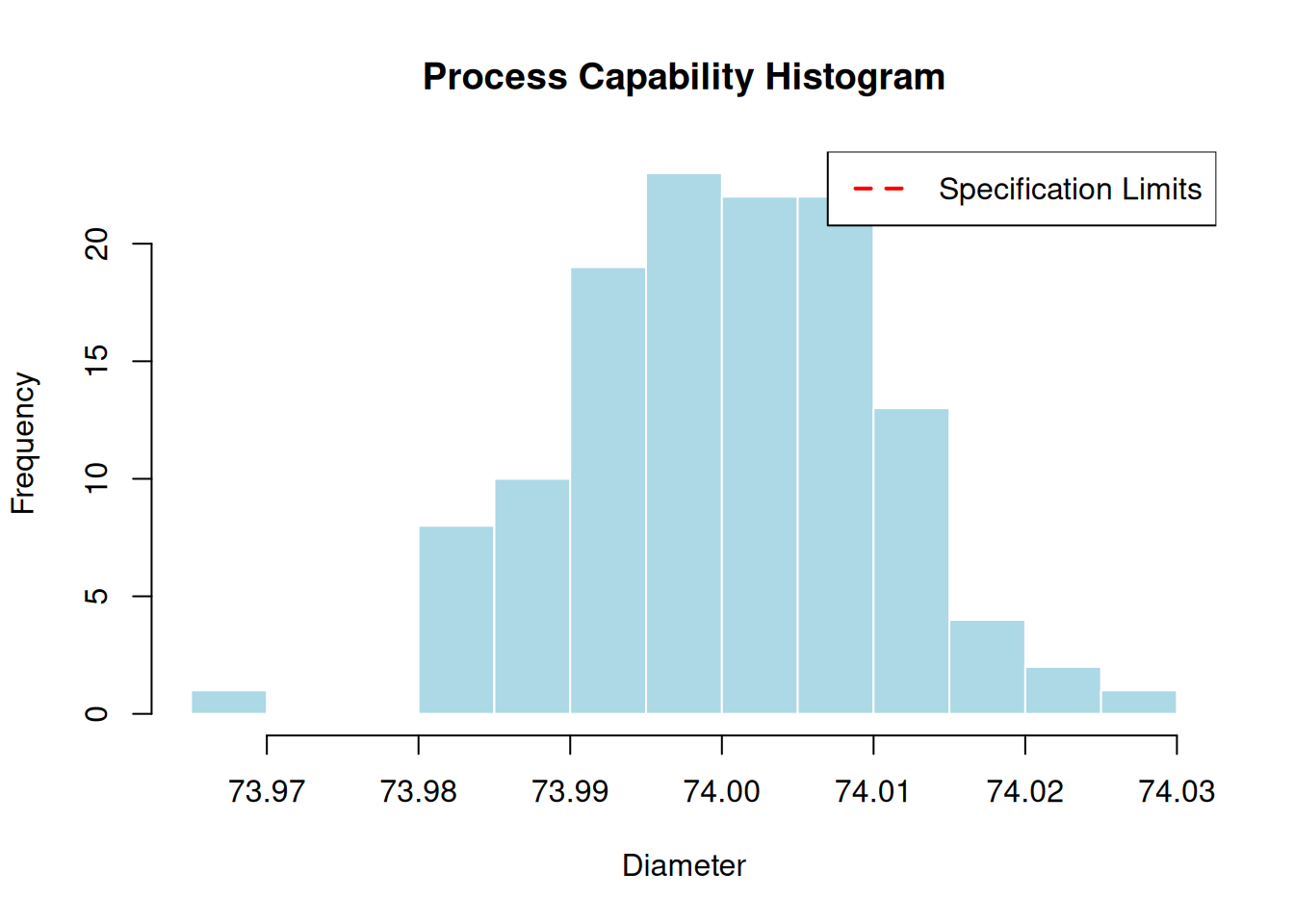
5.6 Target Value Considerations
When you have a target value19 (nominal specification), you can calculate Cpm:
# Capability analysis with target value
target_value <- 74.00  # Nominal specification
pc_target <- qcc::process.capability(q, spec.limits = spec_limits, target = target_value)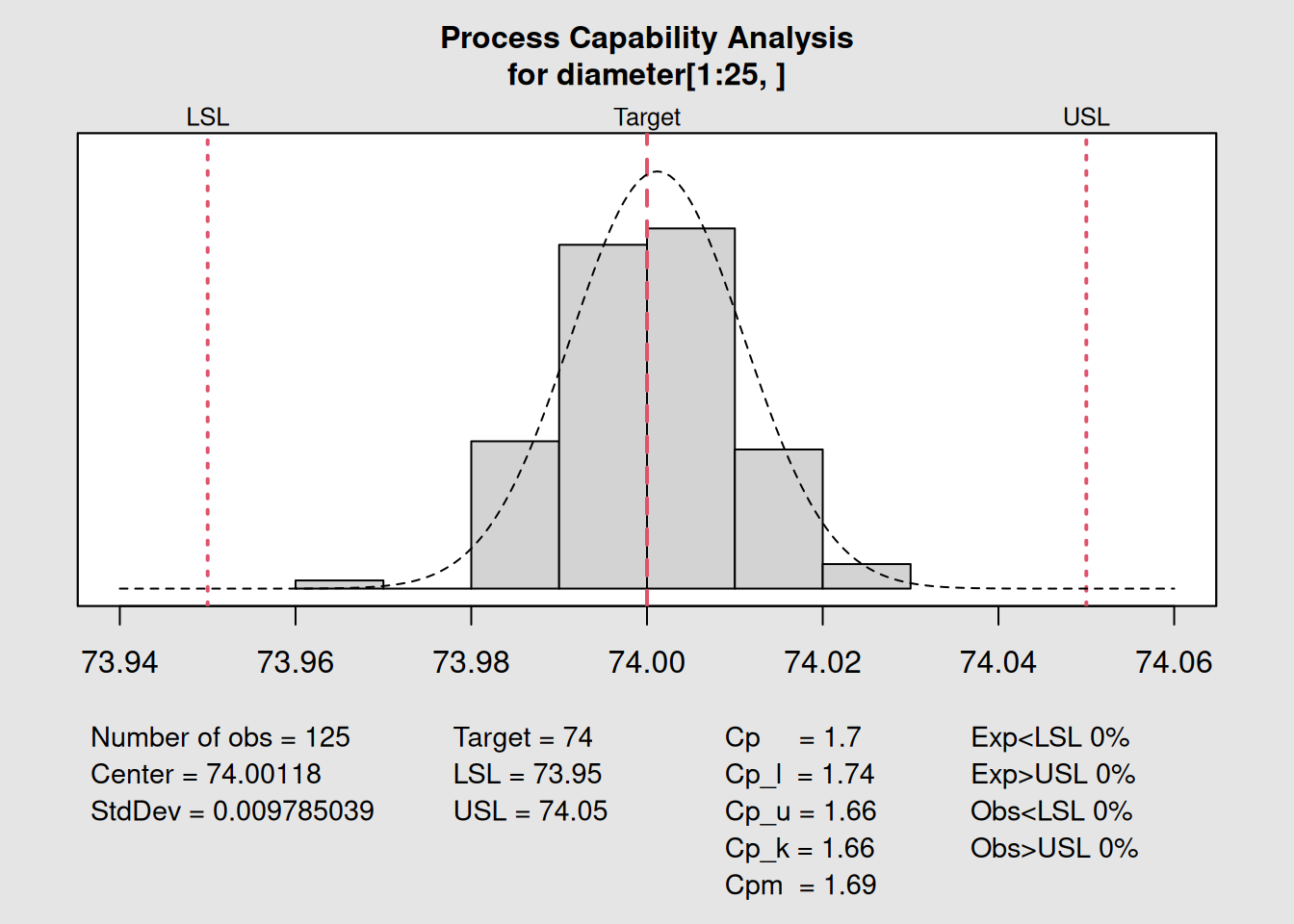
##
## Process Capability Analysis
##
## Call:
## qcc::process.capability(object = q, spec.limits = spec_limits,     target = target_value)
##
## Number of obs = 125          Target = 74
##        Center = 74              LSL = 73.95
##        StdDev = 0.009785        USL = 74.05
##
## Capability indices:
##
##       Value   2.5%  97.5%
## Cp    1.703  1.491  1.915
## Cp_l  1.743  1.555  1.932
## Cp_u  1.663  1.483  1.844
## Cp_k  1.663  1.448  1.878
## Cpm   1.691  1.480  1.902
##
## Exp<LSL 0%    Obs<LSL 0%
## Exp>USL 0%    Obs>USL 0%
print(pc_target)## $nobs
## [1] 125
##
## $center
## [1] 74.00118
##
## $std.dev
## [1] 0.009785039
##
## $target
## [1] 74
##
## $spec.limits
## LSL USL
## 73.95 74.05
##
## $indices
## Value 2.5% 97.5%
## Cp 1.703281 1.491411 1.914826
## Cp_l 1.743342 1.554765 1.931919
## Cp_u 1.663219 1.482710 1.843729
## Cp_k 1.663219 1.448129 1.878310
## Cpm 1.691111 1.480113 1.901786
##
## $exp
## Exp < LSL Exp > USL
## 0 0
##
## $obs
## Obs < LSL Obs > USL
## 0 0
# Note: plot(pc_target) would show the capability histogram with targetCpm20 considers deviation from target:
\[Cpm = \frac{USL - LSL}{6\sqrt{\sigma^2 + (\mu - T)^2}}\]
Where T is the target value.
5.7 One-Sided Specifications
Sometimes you only have one specification limit:
# For demonstration - showing one-sided capability concepts
# Note: qcc package may not support infinite limits in all versions

cat("One-sided specifications:\n")
## One-sided specifications:
cat("Upper limit only: USL = 74.05\n")## Upper limit only: USL = 74.05
cat("Lower limit only: LSL = 73.95\n\n")## Lower limit only: LSL = 73.95
# Calculate basic statistics for one-sided interpretation
process_mean <- mean(as.vector(diameter[1:25,]))
process_sd <- sd(as.vector(diameter[1:25,]))

# Upper capability (Cpu)
cpu_manual <- (74.05 - process_mean) / (3 * process_sd)
cat("Upper Capability (Cpu):", round(cpu_manual, 3), "\n")
## Upper Capability (Cpu): 1.616
# Lower capability (Cpl)
cpl_manual <- (process_mean - 73.95) / (3 * process_sd)
cat("Lower Capability (Cpl):", round(cpl_manual, 3), "\n")
## Lower Capability (Cpl): 1.6945.8 Capability Benchmarks and Decision Rules
5.8.1 Industry Benchmarks
| Index Value | Process Classification | Action Required |
|---|---|---|
| ≥ 2.0 | World Class | Maintain excellence |
| 1.67 - 2.0 | Excellent | Minor improvements |
| 1.33 - 1.67 | Adequate | Monitor closely |
| 1.0 - 1.33 | Marginal | Improve process |
| < 1.0 | Inadequate | Major action needed |
5.8.2 Decision Matrix
# Create decision matrix based on capability indices
create_capability_assessment <- function(cp, cpk) {
  if (cp >= 1.33 && cpk >= 1.33) {
    return("Process is capable and well-centered")
  } else if (cp >= 1.33 && cpk < 1.33) {
    return("Process has potential but needs centering")
  } else if (cp < 1.33 && cpk >= 1.0) {
    return("Process needs variation reduction")
  } else {
    return("Process needs major improvement")
  }
}

# Example assessments
cat("Assessment for our piston rings process:\n")
## Assessment for our piston rings process:
cat(create_capability_assessment(pc$indices[1], pc$indices[4]), "\n")## Process is capable and well-centered5.9 Confidence Intervals for Capability Indices
Understanding the uncertainty in capability estimates is crucial:
# Extract confidence intervals
conf_level <- 0.95
cat("Capability Indices with", conf_level*100, "% Confidence Intervals:\n\n")
## Capability Indices with 95 % Confidence Intervals:
indices_names <- c("Cp", "Cpl", "Cpu", "Cpk")
for(i in 1:4) {
  cat(sprintf("%-3s: %.3f [%.3f, %.3f]\n",
              indices_names[i],
              pc$indices[i],
              pc$indices.ci[i,1],
              pc$indices.ci[i,2]))
}
Sample Size Matters
Capability estimates become more reliable with larger sample sizes. Small samples can give misleading results due to wide confidence intervals.
5.10 Specification Limits vs Control Limits
5.10.1 Key Differences
| Aspect | Control Limits | Specification Limits |
|---|---|---|
| Source | Voice of Process | Voice of Customer |
| Purpose | Detect changes | Define requirements |
| Calculation | Based on process data | Set by design/customer |
| Position | Can change with process | Fixed by specifications |
# Visualize the difference
plot(q, title = "Control Limits vs Specification Limits")

# Add specification limits to the chart
abline(h = spec_limits[1], col = "red", lty = 2, lwd = 2)
abline(h = spec_limits[2], col = "red", lty = 2, lwd = 2)

# Add legend
legend("topright",
       legend = c("Control Limits", "Specification Limits"),
       col = c("blue", "red"),
       lty = c(1, 2),
       lwd = 2)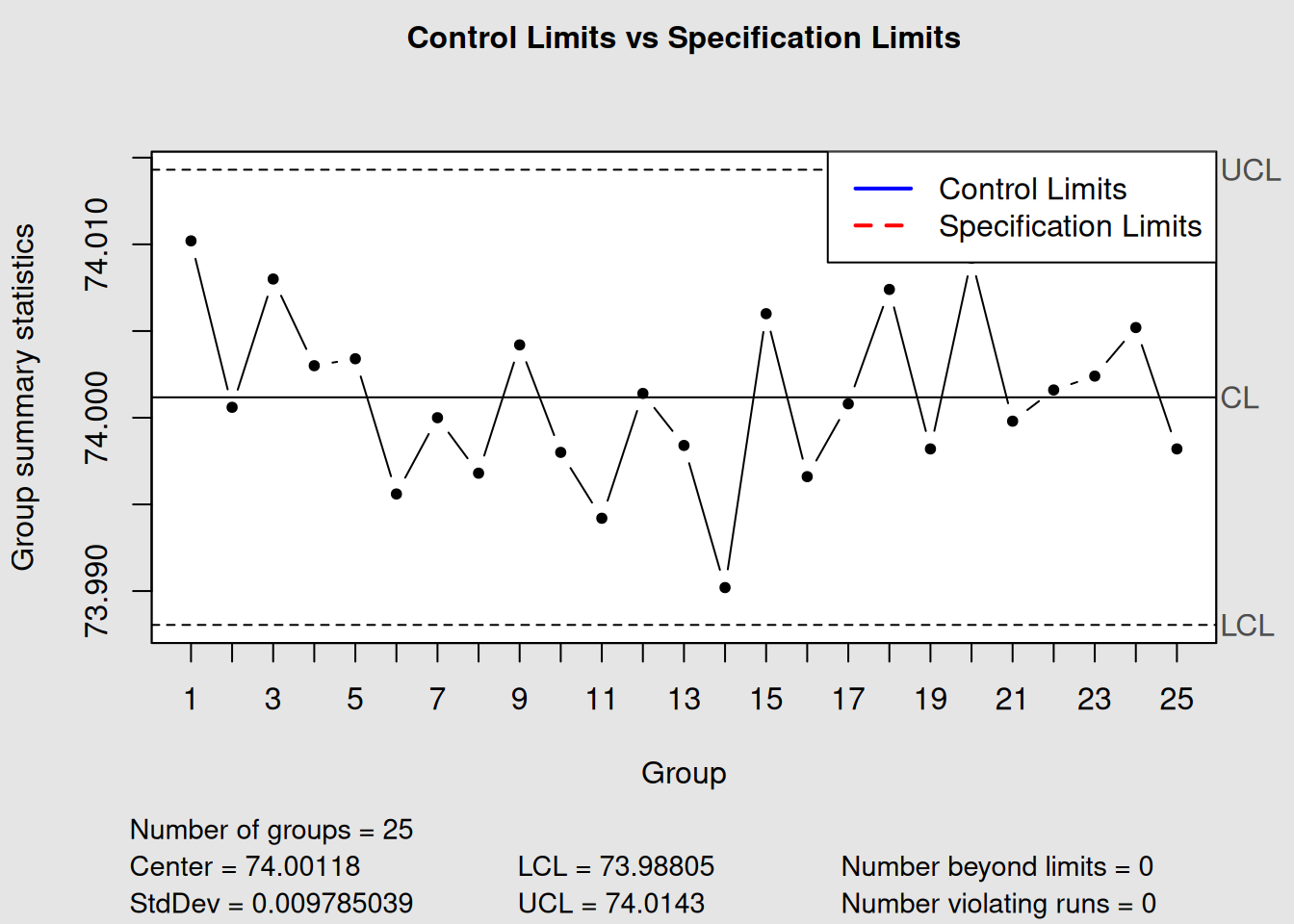
5.11 Process Capability Study Workflow
5.11.1 Step 1: Process Stability Check
# Ensure process is in statistical control first
stability_check <- function(qcc_object) {
  violations <- length(qcc_object$violations)
  if (violations == 0) {
    cat("Process is stable - proceed with capability study\n")
    return(TRUE)
  } else {
    cat("Process has", violations, "violations - stabilize first\n")
    return(FALSE)
  }
}

stability_check(q)
## Process has 2 violations - stabilize first## [1] FALSE5.11.2 Step 2: Collect Adequate Data
Sample Size Guidelines
- Minimum: 100 individual measurements
-
Recommended: 125-150 measurements
- Subgroup size: 4-5 pieces per subgroup
- Time frame: Cover normal process variation
5.11.3 Step 3: Perform Capability Analysis
# Complete capability study checklist
cat("Capability Study Checklist:\n")
## Capability Study Checklist:
cat("Process stability confirmed\n")## Process stability confirmed## Adequate sample size (n = 125 )
cat("Specification limits defined\n")## Specification limits defined
cat("Measurement system validated\n")## Measurement system validated
cat("Normal distribution assumed\n")## Normal distribution assumed5.11.4 Step 4: Interpret and Act
# Action plan based on capability results
current_cpk <- pc$indices[4]

cat("Current Cpk:", round(current_cpk, 3), "\n")
## Current Cpk: 1.663
cat("Recommended Action:\n")## Recommended Action:
if (current_cpk >= 1.33) {
  cat("- Maintain current process\n")
  cat("- Consider tightening specifications\n")
  cat("- Share best practices\n")
} else if (current_cpk >= 1.0) {
  cat("- Improve process centering\n")
  cat("- Reduce variation where possible\n")
  cat("- Increase inspection frequency\n")
} else {
  cat("- Immediate process improvement required\n")
  cat("- Consider 100% inspection\n")
  cat("- Root cause analysis needed\n")
}
## - Maintain current process
## - Consider tightening specifications
## - Share best practices5.12 Advanced Capability Considerations
5.12.1 Non-Normal Data
When data isn’t normally distributed:
# Check normality assumption
shapiro_test <- shapiro.test(as.vector(diameter[1:25,]))
cat("Shapiro-Wilk normality test p-value:", round(shapiro_test$p.value, 4), "\n")
## Shapiro-Wilk normality test p-value: 0.7861
if (shapiro_test$p.value < 0.05) {
  cat("Data may not be normal - consider transformation\n")
} else {
  cat("Normality assumption reasonable\n")
}
## Normality assumption reasonable5.12.2 Process Capability Over Time
Monitor capability trends:
# Simulate capability tracking over time
months <- c("Jan", "Feb", "Mar", "Apr", "May", "Jun")
cpk_values <- c(1.45, 1.38, 1.42, 1.35, 1.33, 1.40)

capability_trend <- data.frame(Month = months, Cpk = cpk_values)
print(capability_trend)
## Month Cpk
## 1 Jan 1.45
## 2 Feb 1.38
## 3 Mar 1.42
## 4 Apr 1.35
## 5 May 1.33
## 6 Jun 1.40
# Simple trend visualization
plot(1:6, cpk_values, type = "b",
     xlab = "Month", ylab = "Cpk",
     main = "Capability Trend Over Time",
     xaxt = "n", ylim = c(1.2, 1.5))
axis(1, at = 1:6, labels = months)
abline(h = 1.33, col = "red", lty = 2, lwd = 2)
text(3, 1.31, "Minimum Capability", col = "red")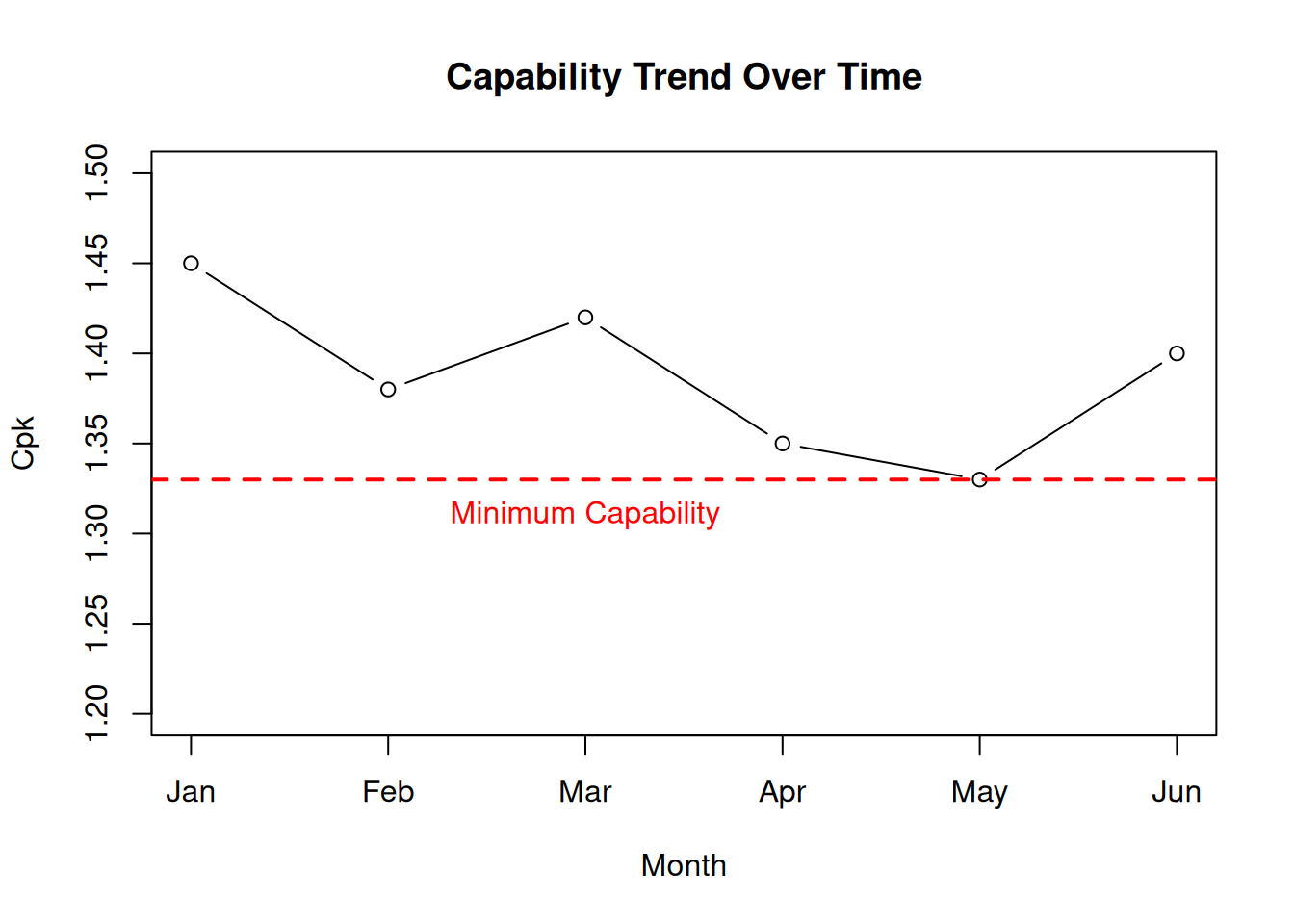
5.13 Capability Study Report Template
A professional capability study should include:
5.13.1 Executive Summary
- Process capability indices (Cp, Cpk)
- Conclusion: Is the process capable?
- Recommended actions
5.14 Common Capability Pitfalls
Avoid These Mistakes
- Unstable Process: Never do capability studies on out-of-control processes
- Insufficient Data: Don’t use small samples (< 100 measurements)
- Wrong Distribution: Assuming normality without checking
- Mixing Data: Combining different operators, shifts, or time periods
- Specification Confusion: Using control limits instead of customer specs
5.15 Key Takeaways
- Process Capability compares the voice of the customer to the voice of the process
- Cp/Cpk represent short-term capability; Pp/Ppk represent long-term performance
- Cpk ≥ 1.33 is the generally accepted minimum for a capable process
- Process stability must be confirmed before conducting capability studies
- Confidence intervals help assess the reliability of capability estimates
- Continuous monitoring of capability ensures sustained performance
5.16 Chapter Summary
Process capability studies are essential tools for determining whether your process can consistently meet customer requirements. By understanding and applying capability indices like Cp, Cpk, Pp, and Ppk, you can make informed decisions about process improvements, specification negotiations, and quality assurance strategies.
Remember: Capability is not just a number—it’s a pathway to understanding your process’s relationship with customer expectations and a guide for continuous improvement efforts.
In our next chapter, we’ll explore Pareto analysis and how it complements capability studies to help prioritize quality improvement efforts effectively.